

Add steering wheel heating function (replace steering control module and clock spring)
Porsche vehicles are equipped only with the options originally specified at the factory. If the vehicle was not originally equipped with a heated steering wheel, the factory steering control module and clock spring do not contain the required heating control electronics or power supply pins for steering wheel heating.
To retrofit a heated steering wheel, the steering control module and clock spring must be replaced with heating-capable versions. After installation, the heating function must be activated.

To add the steering wheel heating function, a heated steering wheel and a heating-capable steering wheel electronics control unit (clock spring) are required. After installation, the heating function must be activated using PIWIS with a VIN-specific enabling code.
Your vehicle’s VIN is required to purchase the activation codes. For 997 and 987 models, no activation code is required.

If the vehicle is equipped with a basic steering wheel (PDK buttons only), or if the steering control module part number is 7PP.953.568.AR, the steering control module must be replaced with a multifunction-capable version. Replace it with the multifunction steering control module number P/N 958.652.568.14, then perform the required coding.

Step 1 – Replace the steering control module
Replace the steering control module (including the clock spring) with a heating- and multifunction-capable unit. For 991.1/981/958.1 models, use the steering control module P/N 958.652.568.14, which supports both heated and multifunction steering wheels (includes the clock spring).

997.2 Heating and Multifunction Support Steering Control Module Part Number: 997-613-299-02
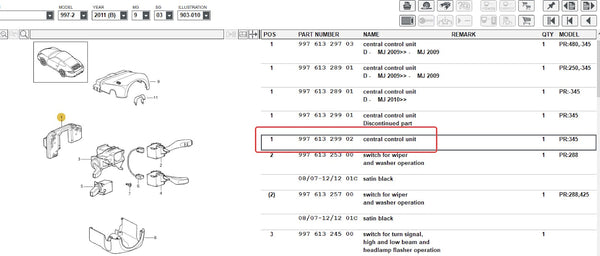
Heating Support Clock Spring Part Number: 955-652-211-22

Step 2 – Purchase activation codes
Purchase the VIN-specific heating and multifunction activation codes.
Step 3 – Install and code
Have a Porsche dealership install and code the new steering control module using PIWIS. The multifunction and heating functions must be activated during coding.
Detailed coding steps can be found here:
https://gpsadapter.us/blogs/
Important: Installing a new steering control module without proper coding will result in multiple error messages on the instrument cluster. This occurs because several control units must communicate with the steering angle sensor integrated into the steering control module.
Step 4 – Install GPSAdapter
Install the GPSAdapter onto the new steering wheel according to the installation guide.
I recommend moving this within Step 3 so that it is very clear it is related.
*Important coding requirements:
The steering control module must be replaced and coded using PIWIS. During coding, the installer must verify the vehicle’s originally ordered functions (such as on-board computer and cruise control) using the VIN in the Porsche dealer system and apply the correct configuration.
After coding, the steering control module must be calibrated using PIWIS.
The official Porsche guide for multifunction steering wheel operation is provided below for reference: <Download>
The steering control module must be replaced and coded using PIWIS. During coding, the installer must verify the vehicle’s originally ordered functions (such as on-board computer and cruise control) using the VIN in the Porsche dealer system and apply the correct configuration.
After coding, the steering control module must be calibrated using PIWIS.
The official Porsche guide for multifunction steering wheel operation is provided below for reference: <Download>
--------------------------------------------------------------------------------------------
Procedure to replace the steering wheel electronics control unit (including clock spring):
1. Disconnect the battery.
2. Remove the driver’s airbag unit.
3. Remove the original steering wheel.
4. Replace the steering wheel electronics control unit (clock spring). For vehicles without a multifunction steering wheel, also replace the steering-column switch. For vehicles with multifunction controls, the original steering-column switch can remain installed.
2. Remove the driver’s airbag unit.
3. Remove the original steering wheel.
4. Replace the steering wheel electronics control unit (clock spring). For vehicles without a multifunction steering wheel, also replace the steering-column switch. For vehicles with multifunction controls, the original steering-column switch can remain installed.
4.1 Remove the steering column casing.4.2 Remove the steering-column switch.
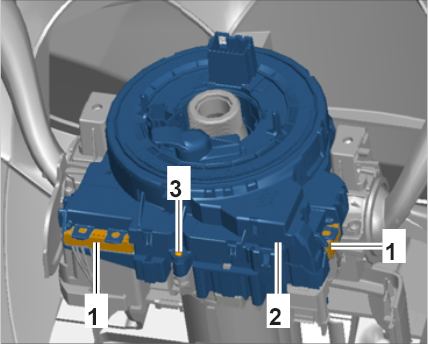

4.3 Install the new steering wheel electronics control unit (clock spring) onto the new steering-column switch (only for vehicles without a multifunction steering wheel).
4.4 Install the steering-column switch.
4.5 Install the steering column cover (P/N 991.552.675.00.1E0) into the steering column casing.
4.5 Install the steering column cover (P/N 991.552.675.00.1E0) into the steering column casing.

4.6 Install the steering column casing.
5. Code control units and calibrate the steering angle sensor
5.1 Connect the PIWIS Tester before switching on the ignition.
Write the basic coding from the PCM.
5.1.1 Select Steering Wheel Electronics Control Unit.
Confirm the prompt “Create vehicle analysis log (VAL)?” by pressing F11.
Switch to the Maintenance/Repairs menu.
5.1.2 Select Control Unit Replacement.
Press F12 to continue.
5.1.3 Select Write Data Mode.
Press F12 to continue, then press F8 to write the basic information.
Wait until the message “Coding has been written successfully” appears.
Press F12 to continue.
5.1.4 Press F11 to return.
Switch to the Overview menu and verify the chassis number stored in the steering wheel electronics control unit.
5.1.5 Select Steering Wheel Electronics Control Unit again.
Switch to the Extended Identification menu.
Verify the chassis number and correct it if necessary.
6. Maintain vehicle data and perform vehicle coding by following this guide:
https://gpsadapter.us/blogs/installation-guide/upgrade-sport-style-steering-wheel-to-multifunction-coding-guide
https://gpsadapter.us/blogs/
7. Enable functions
7.1 In PIWIS, switch to Maintenance/Repairs menu and select Function Enable.
7.2 Enable Heated Steering Wheel and Multifunction Steering Wheel.
Enter the activation codes and confirm by selecting the Status field.
7.3 If required, enable Cruise Control.
Enter the activation code and confirm by selecting the Status field.
7.4 Press F8 to execute.
Wait until the message “Enable was successful” appears, then press F12 to continue.
8. Calibrate steering-angle sensor
The steering angle sensor is integrated into the steering wheel electronics control unit (clock spring) and records steering wheel movement. This data is transmitted to the PSM control unit via the CAN bus.
The steering angle sensor is integrated into the steering wheel electronics control unit (clock spring) and records steering wheel movement. This data is transmitted to the PSM control unit via the CAN bus.
8.1 In PIWIS, navigate to:Control Unit Overview → Steering Wheel Electronics → Maintenance/Repairs → Steering Angle Sensor Calibration8.2 Follow the PIWIS on-screen prompts.Calibration is complete when the PSM warning indicator in the instrument cluster turns off.
9. Clear fault memory
Read out the fault memory of all control units.
Address any stored faults, then erase all fault memories.
Read out the fault memory of all control units.
Address any stored faults, then erase all fault memories.